> ## Documentation Index
> Fetch the complete documentation index at: https://docs.mainly.ai/llms.txt
> Use this file to discover all available pages before exploring further.
# Using LLM tools
> This guide teaches you how to use LLM tools in Mainly AI.
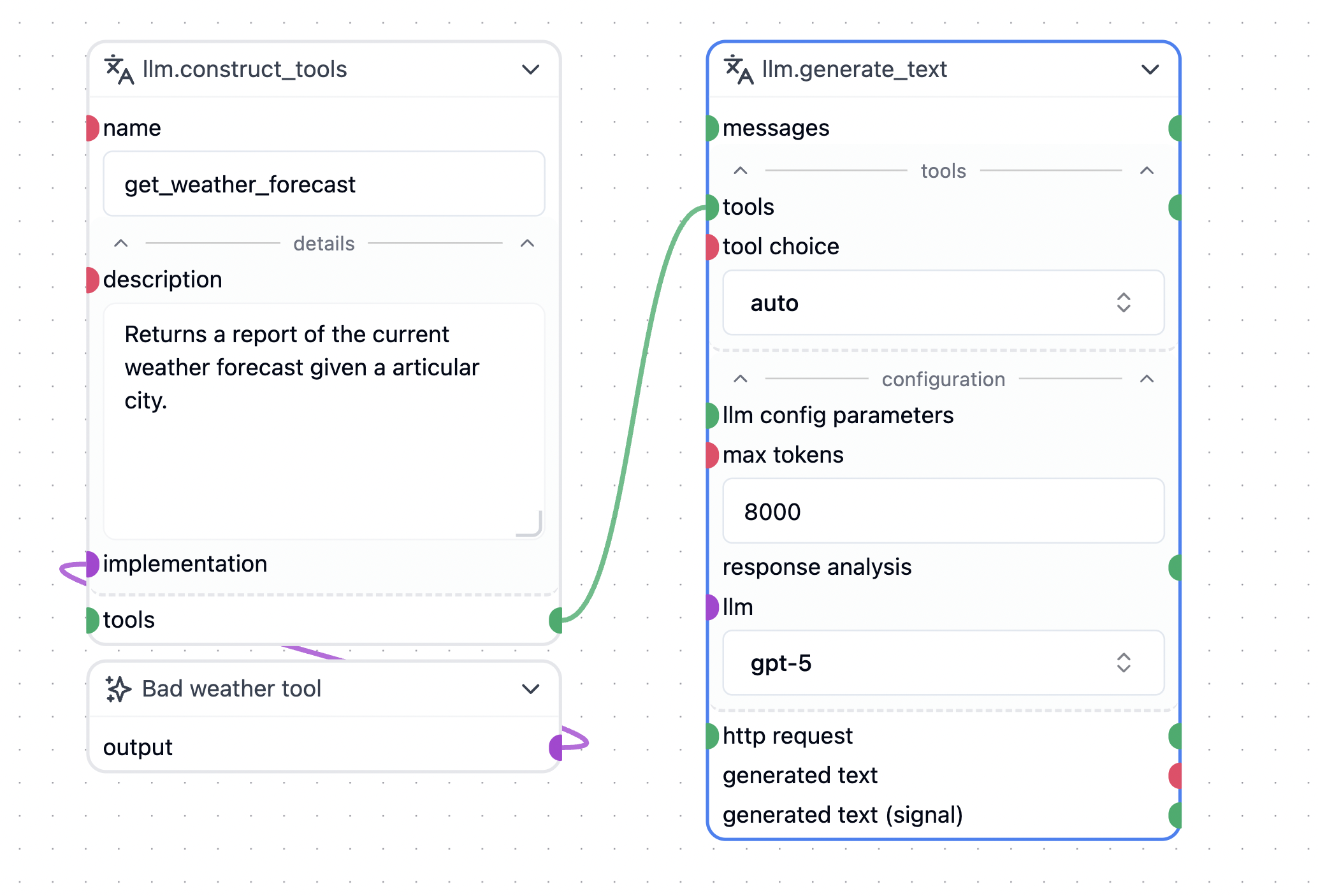 Tools are functions invoked by the LLM during inference. Note that not all LLMs support tools, and Mainly AI does not support tools for every capable model.
Currently, the `llm.generate_text` node supports tools for:
* OpenAI's GPT models
* Google's Gemini models
* BergetAI's GPT OSS model
To create a new tool, drag a wire from the `tools` socket onto the canvas and select `llm.construct_tool`.
This creates a template for your implementation. The implementation node is an API node that acts as the interface for your tool.
The only method you need to implement is `async __call__`.
Example:
```python theme={null}
from mirmod import miranda
@wob.init()
def init(self):
self.api = None
@wob.transmitter("model", "output")
def transmit_value(self):
return self.api
@wob.execute()
async def execute(self):
class API:
async def __call__(self, city:str):
return "It is going to be bad weather in {}".format(city)
self.api = API()
```
The signature of the `__call__` method defines the parameters the LLM should send to the tool.
In some cases, you may need access to the internal state of the `llm.generate_text` node. To achieve this, define a function with the signature `def inner_call(http=None, messages=None)` and return this function instead of a standard string response.
Returning this function prompts the `llm.generate_text` node to invoke it with the `http` and `messages` arguments. This provides access to HTTP-specific context and the message history, which you can then search or forward to another LLM.
Example:
```python theme={null}
from mirmod import miranda
@wob.init()
def init(self):
self.api = None
@wob.transmitter("model", "output")
def transmit_value(self):
return self.api
@wob.execute()
async def execute(self):
class API:
async def __call__(self, city:str):
async def inner_call(http=None, messages=None):
nonlocal city
await http.event("delta","Send text through the http request API")
return "It is going to be bad weather in {}".format(city)
return inner_call
self.api = API()
```
Tools can be useful even if they perform no functional action. For instance, an empty tool named "take\_notes" will still be called by the LLM if it deems it relevant. This tool call is recorded in the message history, which the LLM sees. Consequently, the LLM "believes" it has taken notes, which influences its future inference. In this context, empty tools function as a "thinking" mechanism.
## llm.construct\_tool
The implementation of the tool is wrapped behind a `llm.construct_tool` node. This node is an API node that acts as the interface for your tool. The only method you need to implement is `async __call__`. The `llm.construct_tool` node will automatically generate the necessary metadata for the tool, including the tool's name, description, and parameters. The description can be provided by adding a `def description(self) return ""` method to your API class, or it can be typed directly in the `description` field of the `llm.construct_tool` node.
The name of the tool, from the point of view of the LLM, is written in the `name` field of the `llm.construct_tool` node.
Tools are functions invoked by the LLM during inference. Note that not all LLMs support tools, and Mainly AI does not support tools for every capable model.
Currently, the `llm.generate_text` node supports tools for:
* OpenAI's GPT models
* Google's Gemini models
* BergetAI's GPT OSS model
To create a new tool, drag a wire from the `tools` socket onto the canvas and select `llm.construct_tool`.
This creates a template for your implementation. The implementation node is an API node that acts as the interface for your tool.
The only method you need to implement is `async __call__`.
Example:
```python theme={null}
from mirmod import miranda
@wob.init()
def init(self):
self.api = None
@wob.transmitter("model", "output")
def transmit_value(self):
return self.api
@wob.execute()
async def execute(self):
class API:
async def __call__(self, city:str):
return "It is going to be bad weather in {}".format(city)
self.api = API()
```
The signature of the `__call__` method defines the parameters the LLM should send to the tool.
In some cases, you may need access to the internal state of the `llm.generate_text` node. To achieve this, define a function with the signature `def inner_call(http=None, messages=None)` and return this function instead of a standard string response.
Returning this function prompts the `llm.generate_text` node to invoke it with the `http` and `messages` arguments. This provides access to HTTP-specific context and the message history, which you can then search or forward to another LLM.
Example:
```python theme={null}
from mirmod import miranda
@wob.init()
def init(self):
self.api = None
@wob.transmitter("model", "output")
def transmit_value(self):
return self.api
@wob.execute()
async def execute(self):
class API:
async def __call__(self, city:str):
async def inner_call(http=None, messages=None):
nonlocal city
await http.event("delta","Send text through the http request API")
return "It is going to be bad weather in {}".format(city)
return inner_call
self.api = API()
```
Tools can be useful even if they perform no functional action. For instance, an empty tool named "take\_notes" will still be called by the LLM if it deems it relevant. This tool call is recorded in the message history, which the LLM sees. Consequently, the LLM "believes" it has taken notes, which influences its future inference. In this context, empty tools function as a "thinking" mechanism.
## llm.construct\_tool
The implementation of the tool is wrapped behind a `llm.construct_tool` node. This node is an API node that acts as the interface for your tool. The only method you need to implement is `async __call__`. The `llm.construct_tool` node will automatically generate the necessary metadata for the tool, including the tool's name, description, and parameters. The description can be provided by adding a `def description(self) return ""` method to your API class, or it can be typed directly in the `description` field of the `llm.construct_tool` node.
The name of the tool, from the point of view of the LLM, is written in the `name` field of the `llm.construct_tool` node.
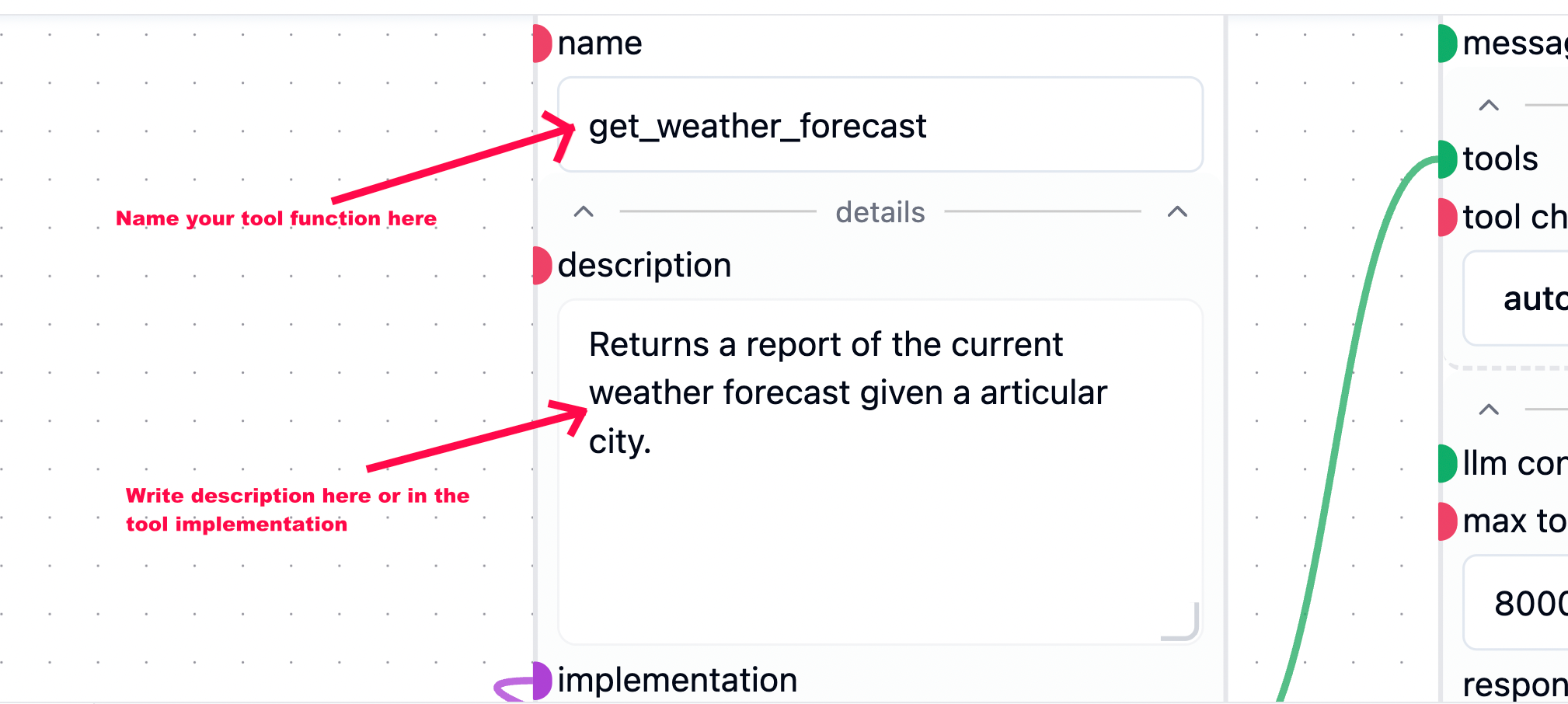 You can write the description of the tool in the tool implementatain node as well, and if you do then on the next exeuctioon thethe `description` field of the `llm.construct_tool` node will be updated with the description from the tool implementation node.
Example:
```python theme={null}
@wob.execute()
async def execute(self):
class API:
def description(self):
return "Returns a really bad weather report from the specified city."
async def __call__(self, city:str):
async def inner_call(http=None, messages=None):
nonlocal city
await http.event("delta","Send text through the http request API")
return "It is going to be bad weather in {}".format(city)
return inner_call
self.api = API()
```
You can write the description of the tool in the tool implementatain node as well, and if you do then on the next exeuctioon thethe `description` field of the `llm.construct_tool` node will be updated with the description from the tool implementation node.
Example:
```python theme={null}
@wob.execute()
async def execute(self):
class API:
def description(self):
return "Returns a really bad weather report from the specified city."
async def __call__(self, city:str):
async def inner_call(http=None, messages=None):
nonlocal city
await http.event("delta","Send text through the http request API")
return "It is going to be bad weather in {}".format(city)
return inner_call
self.api = API()
```